
Why Your Smart Garage Opener Keeps Dropping Wi-Fi in Kansas City (Especially with Metal Siding)
By the OnPoint Pro Doors KC team · Updated May 11, 2026 · 7-minute read
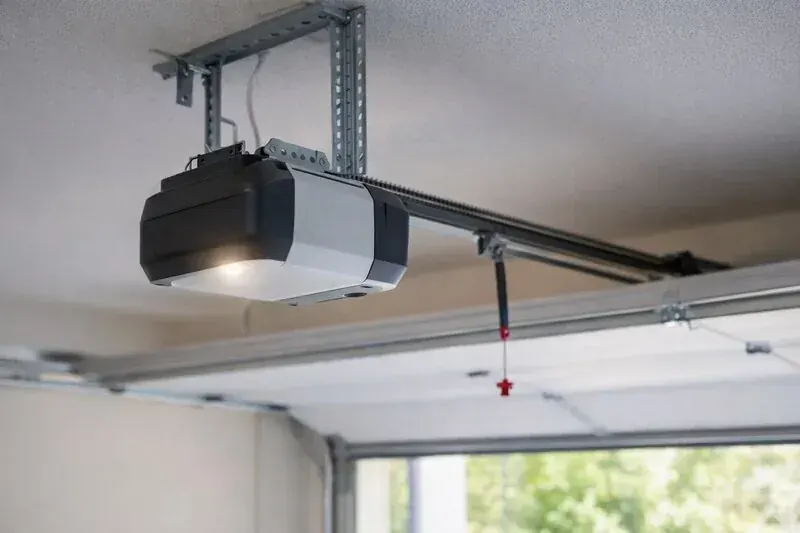
If you own a Kansas City metro home with steel or aluminum siding and your LiftMaster MyQ, Genie Aladdin Connect, or Chamberlain smart-Wi-Fi opener keeps dropping its connection — especially in winter — the cause is almost always not the opener. It's RF attenuation from your home's exterior cladding combined with router placement choices that worked fine for laptops in the living room but fail for an opener mounted on the garage ceiling 35 feet of building structure away. KC has an unusually high concentration of metal-sided homes from the 1990s and 2000s suburban building boom, and this problem is common across Overland Park, Olathe, Liberty, Lee's Summit, and Blue Springs.
QUICK ANSWER
Smart garage opener Wi-Fi drops in KC metal-sided homes are caused by RF signal attenuation through steel or aluminum siding (commonly 10 to 25 dB loss). The fix is one of: (1) add a Wi-Fi extender or mesh node inside the garage, (2) move the main router closer to the garage wall, (3) hardwire the opener via Ethernet using a Powerline or MoCA adapter, (4) upgrade to dual-band router with 2.4 GHz prioritization (smart openers use 2.4 GHz only), or (5) replace the opener Wi-Fi module with a model that supports external antenna. Most KC homes need fix 1 or 4.
Smart opener offline? Here's how to keep it connected.
OnPoint dispatches same-day across all of Kansas City Metro — Overland Park, Lee's Summit, Olathe, Shawnee, Liberty, Independence, Lenexa, Leawood, Prairie Village, Raytown, Blue Springs, and KCMO. Free written estimate before any work.
Why This Problem Is Concentrated in KC Suburbs
KC metro went through a major suburban building boom between 1985 and 2005. During that window, steel and aluminum siding were popular cladding choices for builders in Lee's Summit, Liberty, Overland Park, Olathe, and Blue Springs because they were durable, low-maintenance, and price-competitive with vinyl at the time. Hardie Board and modern fiber-cement options didn't dominate the market until after 2005.
That building stock is still in service. A 1995 metal-sided ranch in Lee's Summit or a 2001 metal-sided two-story in Liberty works fine for everything — until the homeowner upgrades to a smart garage opener and discovers that their MyQ connection drops every few days.
Wi-Fi as a residential technology became dominant in roughly 2003 to 2007. Builders in 1995 weren't thinking about Wi-Fi signal propagation when they specified steel siding. Smart garage openers didn't exist as a product category until 2012 (LiftMaster's original MyQ was launched then). So the technology met the building stock with no design coordination, and the metal-siding KC homes are where the gap shows up.
How Much Signal Loss Are We Talking About?
Real measurements we've taken in KC metal-sided homes:
A smart garage opener needs roughly -75 dBm signal strength at the receiver to maintain a stable connection. Your home router likely outputs +20 dBm at the antenna. After two metal-sided exterior walls (one in, one out, through the garage), you might be losing 30 dB to walls alone, plus 30 to 40 dB to distance and interior framing. The opener ends up around -80 to -90 dBm — below the reliable threshold.
Fix 1: Mesh Node or Extender (Our Most Common Recommendation)
The single best fix for 80% of KC metal-sided home smart-opener Wi-Fi problems is placing a Wi-Fi mesh node or extender inside the garage or in the room directly adjacent to the garage. This bypasses the metal siding entirely because the node communicates with your router through the home's interior (drywall and framing, low attenuation) and then re-broadcasts inside the garage near the opener.
Recommended equipment:
- Eero 6 or Eero 6+ mesh node (a free written estimate per node) — integrates with most home networks, easy setup, dual-band.
- Google Nest Wi-Fi point — simple, reliable, integrates with Google Home.
- Netgear Orbi satellite — higher performance for larger homes.
- TP-Link Deco mesh — budget-friendly with good performance.
PRO TIP
Place the mesh node on the interior side of the wall that separates the garage from the rest of the house. This positions it inside the metal-siding 'cage' so the opener gets full signal, and it positions it close to the main router for backhaul.
Fix 2: Move the Router
If your router is on the opposite end of the house from the garage, moving it to a more central location — or to the room adjacent to the garage — can recover 6 to 18 dB of distance attenuation. This won't fully solve the metal-siding problem, but it can push the opener back above the -75 dBm threshold if it was marginal.
Routers should be placed:
- In a central area of the home Not in a closet, not behind a TV, not in a corner.
- Up high if possible On a shelf or mounted to the wall — Wi-Fi propagates better above furniture.
- Away from metal objects Metal filing cabinets, refrigerators, and large appliances absorb 2.4 GHz signal.
- Away from microwave ovens Microwaves operate at 2.45 GHz and create direct interference.
Fix 3: Hardwired Connection (Ethernet, Powerline, or MoCA)
Some smart openers support Ethernet-based connections that eliminate Wi-Fi entirely. This is the most reliable solution but requires more installation work.
Ethernet cable (best, most work)
Run a Cat 5e or Cat 6 cable from the router or switch to the smart opener's network port (LiftMaster sells a Hardwired Internet Gateway for select MyQ models). Best performance, but requires running cable through walls and/or attic. DIY-able for some homeowners; we can recommend a Warrantied low-voltage installer.
Powerline adapter (medium, less work)
Uses your home's electrical wiring as the network medium. Plug a TP-Link or Netgear Powerline adapter into a wall outlet near the router and another near the opener. The two adapters communicate over the electrical wiring. Reliable in most KC homes built post-1985 with modern wiring; less reliable in pre-1975 homes with knob-and-tube or aluminum wiring. Cost: quoted free in person for a 2-pack.
MoCA adapter (medium, requires cable TV coax)
If your home has cable-TV coaxial cabling running to the garage (common in newer KC suburbs because of garage-located cable-modem installs), MoCA adapters provide a hardwired network over the coax. Most reliable hardwired option short of running new Cat 6. Cost: quoted free in person for a 2-pack.
Fix 4: Dual-Band Router with 2.4 GHz Optimization
Many KC home routers are configured to push devices to 5 GHz for higher speed. Smart garage openers are 2.4 GHz only and benefit from a router that prioritizes 2.4 GHz performance.
Look for routers that allow you to:
Increase 2.4 GHz transmit power (some routers cap at 50% by default).
Set channel manually rather than letting auto-channel pick a congested channel (use 1, 6, or 11 only).
Disable 'smart-connect' on the 2.4 GHz band so the opener gets a dedicated SSID it always connects to.
Use 20 MHz channel width instead of 40 MHz on 2.4 GHz — narrower channels are more robust at long range.
Fix 5: Wi-Fi Module Replacement (Last Resort)
Some opener models have replaceable Wi-Fi modules that can be upgraded to better-antenna versions. LiftMaster's MyQ Smart Hub and Chamberlain's MyQ Smart Hub both have aftermarket external-antenna options. Genie Aladdin Connect's module is fixed and not replaceable.
This is the last resort — usually not needed if fixes 1 through 4 are applied first. Cost: quoted free in person for the module, plus 30 minutes of install labor.
What We Do When Customers Call Us With This Problem
OnPoint Pro Doors gets several calls every month from KC homeowners whose smart opener keeps dropping its Wi-Fi connection. Our diagnostic process:
- Confirm the symptom. We verify the opener mechanically works fine and the issue is purely Wi-Fi / smart-feature reliability.
- Identify the home's siding material. Steel, aluminum, vinyl, fiber-cement, brick, etc. This tells us how much signal attenuation we're working with.
- Locate the home router. Distance from opener, line of sight, walls in between.
- Measure signal strength at the opener. Phone-based tools (Wi-Fi Analyzer apps) give us a dBm reading at the opener location.
- Recommend the right fix. Most KC homes get a mesh-node or extender recommendation; some get hardwired solutions; rarely we recommend opener-module replacement.
- Schedule the install (if we're doing it). We do small low-voltage work in conjunction with our garage door service, or refer to a network installer if scope is bigger.
PRO TIP
If your smart garage opener is mostly reliable but occasionally drops, try this free test first: power-cycle your home router (unplug for 30 seconds, plug back in). Routers that have been running for 30+ days accumulate connection-table issues that mimic siding-attenuation problems. About 15% of the calls we get are solved by a simple router reboot.
Frequently Asked Questions
Does metal siding really block Wi-Fi signal to my garage opener?
Yes, dramatically. Steel and aluminum siding attenuate 2.4 GHz Wi-Fi signal by 10 to 25 dB depending on siding gauge, insulation behind it, and angle of incidence. A modern smart opener like LiftMaster's MyQ needs roughly -75 dBm or stronger signal to maintain a reliable connection. If your router is in the living room and your garage is on the other side of two metal-sided exterior walls plus interior framing, you're often at -85 to -95 dBm at the opener — below the connection threshold.
Why is my smart opener fine in summer but drops every winter?
Two reasons: (1) garage temperature drops below 40°F and the Wi-Fi module's internal components have higher resistance and reduced sensitivity; (2) cold-weather humidity changes in the garage air affect signal propagation by 1 to 3 dB — usually not the whole problem but enough to push a marginal connection below threshold. Combined with the metal-siding attenuation, winter pushes a 'works most of the time' connection into 'works half the time.'
Do all smart garage openers have this Wi-Fi problem?
All current smart openers (LiftMaster MyQ, Chamberlain MyQ, Genie Aladdin Connect, Linear Wi-Fi, Marantec Synergy) use 2.4 GHz Wi-Fi exclusively. None support 5 GHz Wi-Fi. They all have similar internal antenna designs. So the metal-siding attenuation problem affects all brands roughly equally. Some have better antenna gain than others (LiftMaster 8500W jackshaft series has the best in our experience), but no current model fully overcomes 20+ dB siding attenuation.
Is a Wi-Fi extender or mesh node enough to fix this?
Usually yes. The most reliable fix in KC metal-sided homes is placing a mesh node (Eero, Google Nest Wi-Fi, Orbi) or a Wi-Fi extender inside the garage or in the room adjacent to the garage. This bypasses the metal siding entirely. Cost: quoted free in person for a single node. Improves reliability from 'drops weekly' to 'never drops' in most cases.
Can I hardwire my smart garage opener via Ethernet?
Some opener models support an Ethernet adapter that plugs into the smart hub, eliminating Wi-Fi dependency entirely. LiftMaster sells a Hardwired Internet Gateway for select MyQ models. If your house wiring supports it, this is the most reliable solution — but it requires either running a Cat 5 / Cat 6 cable to the garage, or using a Powerline adapter (uses house electrical wiring as the network medium) or MoCA adapter (uses cable-TV coax).
What KC neighborhoods have the most metal-siding homes?
KC suburban tract construction from 1985 to 2005 used a lot of steel and aluminum siding before vinyl became dominant. Affected neighborhoods include: large parts of Lee's Summit (north of I-470, Summit Pointe, Mike Onka Drive area), much of Liberty (north of 152 Highway), eastern Overland Park (north of 119th between Metcalf and Quivira), older sections of Olathe (north of I-35), and Blue Springs (most of 1990s-2000s subdivisions). Newer neighborhoods built post-2005 are mostly fiber-cement (Hardie Board) or vinyl, which don't attenuate Wi-Fi nearly as much.
Will moving my router closer to the garage help?
Yes if it's currently far from the garage. The relationship between distance and Wi-Fi strength is roughly inverse-square — doubling the distance reduces signal by 6 dB. So moving the router from one end of the house to the wall closest to the garage can recover 6 to 18 dB. Combined with reduced metal-siding attenuation if the router is on the same side as the garage, this can sometimes solve the problem without buying new equipment.
Should I just upgrade to a newer smart opener instead of fixing my Wi-Fi?
Probably not. Current smart openers from all major brands have similar Wi-Fi performance. Replacing one smart opener with another doesn't fix the underlying signal attenuation. Spend the money on the network side (mesh node or extender) rather than on a new opener — you'll get better results.
Get Your Smart Garage Opener Reliable Again
Same-day service across all of Kansas City Metro — Overland Park, Lee's Summit, Olathe, Shawnee, Liberty, Independence, Lenexa, Leawood, Prairie Village, Raytown, Blue Springs, and KCMO. Free written estimate. No service-call fee. Warrantied in Missouri and Kansas.
Call (816) 315-526124/7 Emergency · service@onpointprodoors.com
Related: Opener service → · LiftMaster service → · Genie service → · Full FAQ →